
Productivity Tips That Turn Goals Into Consistent Progress

We may earn a commission for purchases made using our links. Please see our disclosure to learn more.
Big goals often fail for a surprisingly ordinary reason: daily life gets noisy. You may know what you want, yet emails, errands, family needs, and low-energy afternoons keep pushing it aside. The most useful productivity tips do not ask you to become a different person. They help you make better decisions with the time, attention, and energy you already have.
This guide explains how to choose priorities, turn goals into manageable actions, protect focused work, and review progress without turning your planner into another source of pressure. You will also find practical tools for different budgets and working styles, plus research-backed guidance on goal setting, task switching, breaks, and if-then planning.
What Productivity Really Means for Goal Setters
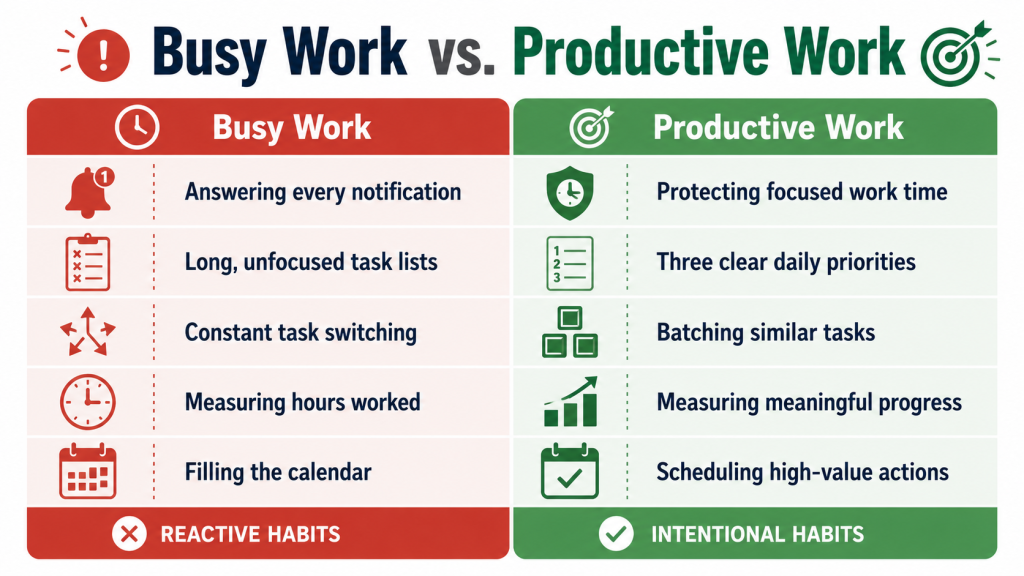
Productivity is not the number of boxes you tick. It is how well your actions move something meaningful forward. A packed day can still leave your main goal untouched.
Separate maintenance—messages, chores, administration—from progress, such as drafting a proposal or finishing a course module. Both matter, but strong productivity tips protect time for progress before maintenance expands to fill the day.
Start With One Clear Outcome
A vague goal such as “be more organized” gives little direction. A useful outcome names what will change, how progress looks, and when you will review it.
Write one sentence describing the result, then check whether it fits your time and responsibilities. Selfcraftr’s guide to building a clear SMART plan explains how to make goals specific, measurable, realistic, relevant, and time-bound.
Turn Goals Into Weekly Actions
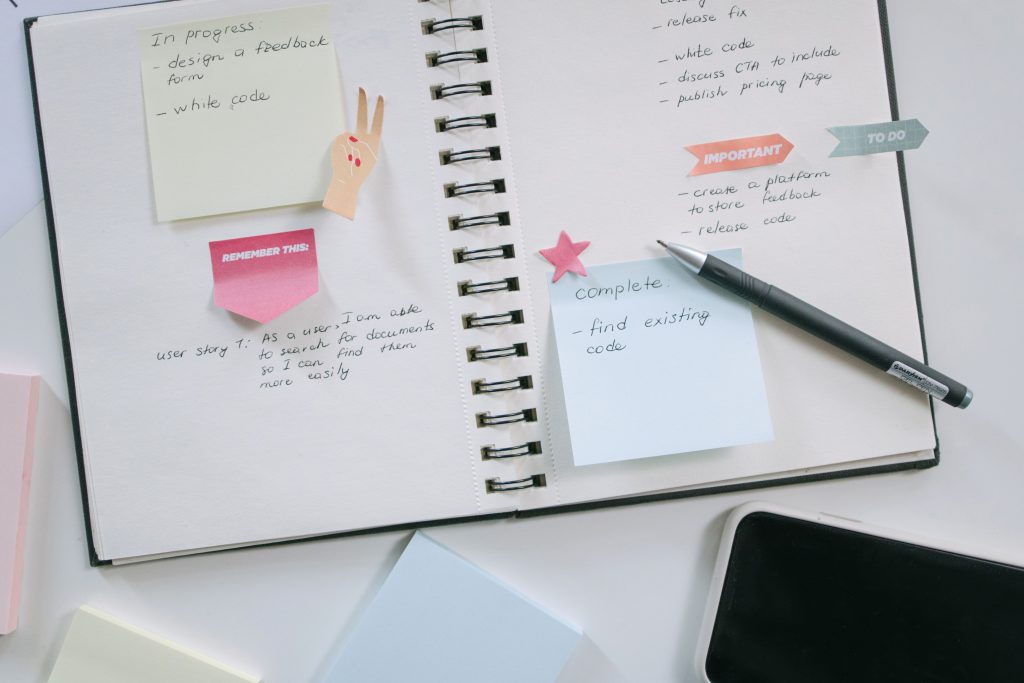
A goal lives in the future; an action belongs on this week’s calendar. “Launch a portfolio” feels intimidating, while “choose three work samples on Tuesday” feels possible.
Work backward to the next milestone, then select one to three actions for the week. Use clear verbs such as draft, call, compare, schedule, or submit. When uncertain, plan the next visible step.
Choose Three Priorities Each Day
Long task lists hide decisions. Choose a daily top three: one meaningful progress task, one necessary maintenance task, and one smaller action that reduces future friction.
Make each priority finishable. “Complete the report” may be too broad, while “draft the findings section” is schedulable. On unpredictable days, define a minimum version so progress can continue.
Use Time Blocking Without Overplanning
Time blocking gives important work a place to happen. Reserve a start time and a realistic window, such as “9:00–10:15: outline presentation.”
Do not schedule every minute. Leave buffers for transitions and delays. Block priorities and fixed commitments, then batch shallow tasks such as email or routine calls. These productivity tips create structure without turning your calendar into fiction.
Protect Focus by Reducing Task Switching
Every switch forces your mind to reload a different task. Reduce voluntary interruptions by closing unrelated tabs, silencing nonessential alerts, and writing the one result you want from the session.
Capture distracting thoughts on paper instead of acting on them. Start with a 25- to 45-minute focus period. One protected block often creates more progress than hours of fragmented availability.

Match Important Work to Your Energy
Attention changes across the day. For one week, note when focused work feels easiest. Place writing, analysis, studying, or problem-solving in your stronger window.
Save filing and basic correspondence for lower-energy periods. This is among the most adaptable productivity tips because it respects shift work, caregiving, school schedules, and different body clocks. The aim is not an early start; it is a better task-energy match.
Build Breaks and Recovery Into the Plan
A break is part of the system. After a focus block, stand, look away from the screen, stretch, drink water, or walk briefly.
Avoid turning every pause into an unplanned scroll that makes returning harder. Protect sleep, meals, movement, and genuine off-time as circumstances allow. Productivity tips that ignore recovery may work briefly, but they rarely support dependable progress.
Use If-Then Plans for Common Obstacles
Decide in advance how you will respond to a predictable obstacle: “If I want to check messages during writing, then I will note the urge and continue until the timer ends.”
Keep the response specific and easy. If a morning becomes chaotic, complete a 15-minute version after lunch. These productivity tips reduce decisions around procrastination, interruptions, low-energy days, and restarting after a missed session.
Review Progress Without Judging Yourself
Set aside 15 to 30 minutes weekly to ask: What worked? What created friction? What adjustment would help?
Treat unfinished tasks as information. Reduce the task, change its timing, remove a barrier, or decide that the goal no longer deserves priority. Shame does not improve scheduling accuracy. A calm review turns productivity from a personality test into a process you can adjust.
Productivity Tips for Home, Study, and Work
At home, define a “good enough” stopping point for open-ended chores. For study, replace “review biology” with “answer 20 practice questions.” At work, protect time for the highest-value deliverable before opening every communication channel.
Shared spaces may need signals such as headphones, a timer, or a note. The best productivity tips fit your environment; a system that works only on ideal days is not practical.
Recommended Products for Applying Productivity Tips
Productivity tips work better when tools reduce friction. These options serve different needs, from quarterly planning to quick visual focus sessions.
| Product | Best use | Main consideration |
| Full Focus Planner | Quarterly goal execution | Structured and detailed |
| Clever Fox Weekly Planner | Guided weekly planning | Structured page design |
| Intelligent Change Productivity Planner | Daily priority setting | Covers three months |
| Time Timer MOD Home | Visual time awareness | Limited to 60 minutes |
| Ticktime T6 | Quick focus intervals | More settings to learn |
| Knock Knock Brain Dump Pad | Capturing mental clutter | Not a full planner |
Full Focus Gray Linen Planner by Michael Hyatt
Best for: Quarterly goal execution
This structured planner uses a 90-day cycle to connect larger goals with weekly and daily actions. It suits professionals or business owners who want regular reviews, priority planning, and a guided system in one place. Its practical strength is depth; however, people who prefer open-ended pages may find the format more structured than necessary.
Clever Fox Weekly Planner Undated, Monthly & Daily Notebook, Black
Best for: Guided weekly planning
This undated planner combines monthly and weekly pages with goal-setting prompts, habit tracking, and a to-do framework. It suits people who want more guidance than a blank notebook without committing to dated pages. Its structured prompts support regular reflection, although users who prefer minimalist layouts may find the page design busier than necessary.
Intelligent Change 3-Month Productivity Planner
Best for: Daily prioritization and focused work
This three-month planner centers each day on important tasks and focused work sessions rather than an endless checklist. It works well for beginners who want prompts without committing to a full year. Its short planning horizon supports experimentation and review, but frequent users will need to replace it more often than an annual planner.
Time Timer MOD Home – Metallic Series – Individual Sized 60 Minute Visual Countdown Timer
Best for: Visual thinkers and shared spaces
This standalone timer displays the remaining portion of an hour as a shrinking colored disk, making time easier to estimate at a glance. It can support desk work, study sessions, meetings, or family routines without relying on a phone. The simple visual design is its strength, though sessions longer than 60 minutes require resetting.
Ticktime T6 Pomodoro Timer Cube for Focus, Study, Work, Task, ADHD, Kitchen
Best for: Fast-start focus sprints
This rechargeable cube offers preset countdown intervals, a Pomodoro cycle, custom timing, a stopwatch, and multiple reminder modes. Flipping the device can start common durations quickly, which helps people who resist opening another app. The flexibility is useful, but users seeking one-button simplicity may need time to learn its controls.
Knock Knock Brain Dump Note Pad, 6 x 9-Inches
Best for: A low-cost mental reset
This 60-sheet notepad gives scattered thoughts, ideas, and reminders one temporary landing place. It is useful before planning a day or whenever mental clutter makes prioritizing difficult. The compact format is inexpensive and approachable, but it does not include scheduling, goal tracking, or review pages, so it works best beside another system.
What Research Says About Productivity Tips
Research supports several principles here, although no method works identically for everyone. A 2002 review of 35 years of goal-setting research found that specific, challenging goals generally improve performance more than vague instructions, provided people have commitment, feedback, and the ability to act. In practice, pair an ambitious outcome with short, concrete steps rather than using difficulty as motivation by itself.
Planning for obstacles also has evidence behind it. A 2015 review of implementation intentions reported that a meta-analysis of 94 independent studies found a medium-to-large average effect on goal attainment. The practical translation is simple: decide “If situation X occurs, then I will do Y.”
The American Psychological Association’s overview of task switching explains that shifting between tasks creates switching costs, especially during complex work. A 2022 systematic review and meta-analysis of micro-breaks found small but significant benefits for vigor and fatigue, while performance effects varied by task and break length. Use these productivity tips as adjustable supports, not guarantees.
Frequently Asked Questions About Productivity Tips
What Are the Best Productivity Tips for Beginners?
Start with one meaningful goal, choose a daily top three, and protect one short focus block. Avoid installing several systems at once. Use a notebook or calendar you already understand, review your week, and change only what creates friction. A simple process used consistently teaches you more than a complicated setup abandoned after three days.
How Can I Be Productive When I Feel Unmotivated?
Shrink the starting step until it feels manageable. Open the document, write one sentence, or work for ten minutes. Then use an if-then plan for the obstacle you expect. Motivation often increases after movement begins, but you should also check whether fatigue, unclear priorities, or an unrealistic workload is the real problem.
Is a Paper Planner Better Than a Digital App?
Neither is universally better. Paper reduces notifications and can make priorities visually obvious, while digital tools offer reminders, search, recurring tasks, and easy changes. Choose based on the friction you experience. Many people use a digital calendar for fixed commitments and a paper planner for daily focus, but one well-used system is enough.
How Many Hours Should I Work Before Taking a Break?
There is no perfect interval for every person or task. Begin with 25 to 50 minutes of focused work followed by a short break, then adjust according to concentration and fatigue. Complex work may need longer settling time, while repetitive work may benefit from shorter cycles. The break should help you return rather than quietly end the session.
Why Do Productivity Tips Stop Working After a Few Weeks?
A method may stop fitting when your workload, energy, responsibilities, or goals change. Novelty also fades, revealing whether the system is genuinely convenient. Review what became difficult: too many steps, unrealistic scheduling, weak priorities, or poor recovery. Keep the useful part, simplify the rest, and design for ordinary days rather than your most motivated day.
Final Recommendation: Build a System You Can Repeat
The most effective productivity tips form a repeatable system: choose one clear outcome, translate it into weekly actions, protect a few daily priorities, and review what actually happened. Add tools only when they solve a specific problem.
Readers who want a guided quarterly structure may prefer the Full Focus Planner, while visual workers may get more value from the Time Timer MOD Home. A notebook and calendar can also be enough.
Start with one goal and one protected work block this week. At week’s end, keep what helped, remove what felt cumbersome, and make one adjustment. The best final recommendation is not to chase more techniques; it is to build a system you can still use on a busy, imperfect day.