
Calendar Management Tips to Stay on Track
We may earn a commission for purchases made using our links. Please see our disclosure to learn more.
You know that tiny panic when you remember a goal you were excited about… three weeks after you forgot to work on it? Yep. We have all been there.
That is why calendar management matters. It is not just about filling boxes with appointments. It is about giving your goals a real place to live. Because honestly, a goal that never reaches your calendar is usually just a wish wearing cute shoes.
In this guide, you will learn how to use calendar management to organize your goals, protect your time, avoid burnout, and actually follow through without building a complicated productivity empire in your living room.
What Calendar Management Really Means
Calendar management is the habit of planning your time with intention instead of reacting to whatever screams the loudest.
It includes your appointments, work tasks, personal goals, routines, deadlines, rest, family commitments, and even “do absolutely nothing” time. Yes, that counts. Sometimes your nervous system needs a meeting with the couch.
Good calendar management helps you answer three simple questions:
- What matters this week?
- When will I work on it?
- What needs to move so I do not overload myself?
At its best, your calendar becomes less of a bossy assistant and more like a kind map.
Why Calendar Management Helps You Follow Through
Most people do not fail at goals because they are lazy. They fail because their goals never become visible, scheduled, and realistic.
Saying “I want to write more” feels inspiring. Scheduling “write for 30 minutes every Tuesday and Thursday at 7 p.m.” gives that goal a fighting chance.
Calendar management turns vague motivation into a plan. It also removes some of the daily decision fatigue. Instead of asking, “What should I do now?” every five minutes, your calendar gently points you back to the next right step.
Start With Goals That Actually Belong to You
Before you open your calendar, pause and ask: “Do I actually want this, or do I just feel like I should want it?”
That question matters.
Maybe your goal is not waking up at 5 a.m. because someone online said successful people do that. Maybe your real goal is having 20 quiet minutes before the day starts, whether that happens at 6:30 a.m. or after the kids go to bed.
Your calendar should reflect your real life, not someone else’s highlight reel.
Try this reflection
Write down your top three goals, then ask:
- Why does this matter to me?
- How might this month’s progress look?
- What is the smallest version of this goal I can schedule?
That last question is magic. Small scheduled actions beat huge imaginary plans almost every time.
Choose a Calendar System You Will Actually Use
The best calendar system is not the prettiest one. It is the one you will actually check.
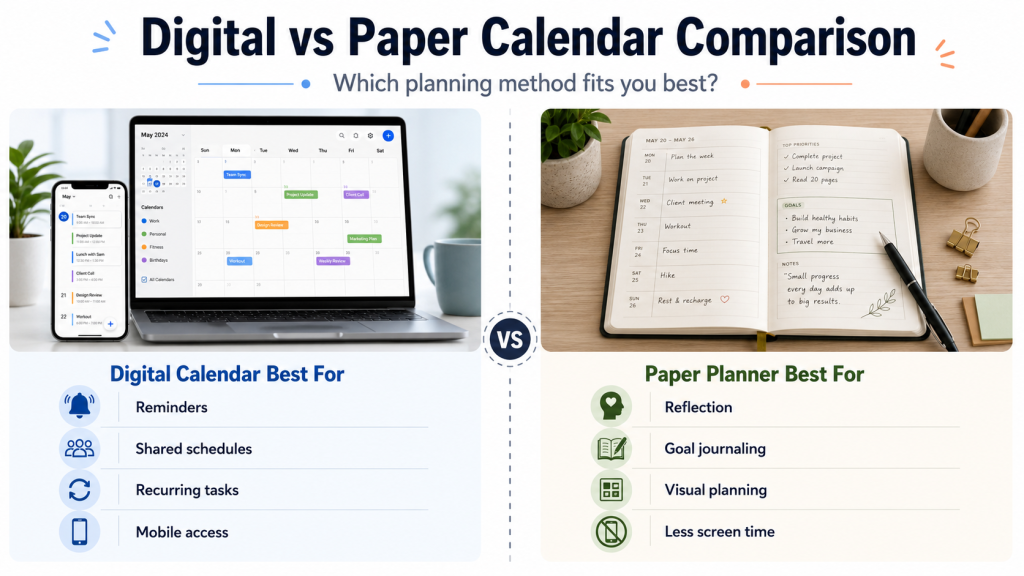
Some people love Google Calendar or Apple Calendar because reminders keep them honest. Others need a paper planner because physically writing things down makes the plan feel real. Some families need a wall calendar where everyone can see soccer practice, bills, school events, and whose turn it is to buy milk.
There is no moral superiority here. Digital, paper, wall calendar, sticky notes, or a hybrid setup can all work.
Choose the system that fits your brain.

Use a Monthly View for the Big Picture
A monthly calendar helps you see the shape of your life before you start cramming goals into every empty corner.
Look at fixed commitments first:
- Work deadlines
- Family events
- Appointments
- Holidays
- Bills
- School schedules
- Travel days
Then add goal milestones. For example, if your goal is to declutter your home, do not write “organize everything.” That is how overwhelm kicks the door open.
Instead, schedule one area per week: closet, kitchen drawer, pantry, paperwork. Suddenly the goal feels like a staircase instead of a mountain.
Plan Your Week Before It Plans You
Weekly planning is where calendar management becomes practical.
Before the start of the week, set aside 15 to 30 minutes. Sunday works for many people, but Friday afternoon or Monday morning can work too. The rhythm is more important than the day.
During your weekly planning session, choose three priorities. Not 19. Not “everything I have avoided since 2021.” Three.
Then place them on your calendar.
A simple weekly planning formula
Use this flow:
- Review last week
- Check upcoming commitments
- Pick three priorities
- Schedule goal blocks
- Add rest and buffer time
- Move anything unrealistic
This is also a great place to build a weekly reset routine so your goals, home, schedule, and mindset feel less scattered before the new week begins.
Turn Goals Into Time Blocks
Time blocking means giving each task a specific block of time on your calendar.
Instead of writing a to-do list that says “work on business,” schedule:
- Monday, 9:00–10:30: outline blog post
- Wednesday, 2:00–3:00: update email list
- Friday, 10:00–10:45: review analytics
This works because your brain sees a clear next step. You are not staring at a giant goal. You are just showing up for one block.
Keep the blocks realistic. If you have a busy home, caregiving responsibilities, a demanding job, or unpredictable energy, start with shorter blocks. A 20-minute focused session still counts.
Use If-Then Planning for Real Life
Life does not care about your perfect calendar. Someone becomes ill. A meeting is delayed. Your internet acts like it has personal issues.
That is why if-then planning helps.
Try this:
- If I miss my morning workout, then I will walk for 15 minutes after dinner.
- If I cannot write for one hour, then I will write one paragraph.
- If my week gets chaotic, then I will protect my top priority and move the rest.
This turns obstacles into backup plans. You are not starting from scratch every time life throws glitter into the fan.

Protect Your Energy, Not Just Your Time
A calendar can look organized and still feel impossible.
That usually happens when you plan as if every hour has the same energy level. It does not.
Maybe your brain is sharp in the morning. It’s possible that your best ideas come to you at night. Maybe you are a parent, student, caregiver, entrepreneur, or full-time employee whose energy depends on the day.
Plan demanding tasks during your strongest hours when possible. Put lighter tasks, errands, or admin work into lower-energy windows.
This one shift can make your schedule feel less like punishment and more like teamwork.
Build Buffer Time Into Your Schedule
Please do not schedule your day like a suitcase packed by someone who refuses to sit on it.
You need breathing room.
Add buffer time between meetings, errands, deep work, school pickup, meals, and appointments. Even 10–15 minutes can help you transition without feeling like you are sprinting through your own life.
Buffer time is especially helpful if you are managing family schedules, chronic stress, creative work, or a job with constant interruptions.
A packed calendar may look productive, but a realistic calendar is usually more effective.
Keep Your Calendar Visible
A goal hidden in an app you never open is basically living in witness protection.
Make your calendar visible. Put a wall calendar in the kitchen. Keep your planner on your desk. Add digital widgets to your phone. Set reminders that show up before the task, not three minutes after you were supposed to leave.
Visibility matters because your environment nudges your behavior.
If your goal is to drink more water, seeing your bottle helps. If your goal is to write, seeing your scheduled writing block helps. If your goal is to manage money better, seeing bill dates helps.
It’s common for out of sight to become out of mind.
Add Color Coding Without Going Overboard
Color coding can make calendar management easier, especially if you are visual.
Try simple categories:
- Work
- Family
- Health
- Personal goals
- Bills
- Rest
- Appointments
The trick is not to turn your calendar into a rainbow spreadsheet that requires a legend and emotional support.
Keep it simple. Colors should help you understand your week quickly. For example, if your calendar has too much work color and no rest color, that tells you something immediately.
Review Your Calendar Daily
A quick daily review keeps your schedule from becoming stale.
Spend five minutes the night before or in the morning. Look at what is coming, check your priorities, and adjust anything unrealistic.
Ask:
- What must happen today?
- What can wait?
- Where do I need breathing room?
- What goal step can I realistically complete?
This keeps you flexible. Calendar management is not about obeying a plan no matter what. It is about staying connected to your priorities as life shifts.
Helpful Products for Calendar Management
The right tool will not do the work for you, but it can make the work easier to see, organize, and repeat.
Clever Fox Planner Daily PRO
The Clever Fox Planner Daily PRO is helpful if you want a paper planner with space for daily planning, gratitude, priorities, and goal tracking.
Features:
- Undated layout
- Daily planning pages
- Goal-setting sections
- Productivity and time management focus
Best for: People who like writing things down and want a structured planner for personal goals, work tasks, and habits.
Blue Sky 2026 Weekly and Monthly Planner
The Blue Sky 2026 Weekly and Monthly Planner is a simple option for managing appointments, deadlines, and weekly priorities.
Features:
- Weekly and monthly views
- Wirebound layout
- Tabs and storage pocket on many versions
- Clean, easy-to-read pages
Best for: Students, professionals, parents, or anyone who wants a straightforward paper planner without extra complexity.
Quartet Glass Dry Erase Calendar
The Quartet Glass Dry Erase Calendar works well as a visible monthly planning board for home offices, kitchens, or shared spaces.
Features:
- Magnetic glass surface
- Monthly planning layout
- Dry erase design
- Modern wall-mounted look
Best for: Visual planners, families, roommates, and home office users who need the month in plain sight.
Skylight Calendar 15-Inch Touchscreen Smart Calendar
The Skylight Calendar is a digital wall calendar designed for busy households.
Features:
- Touchscreen display
- Shared family schedule
- Chore chart options
- Color-coded events
Best for: Families, couples, and shared homes that need one central place for schedules, routines, and reminders.
Post-it Super Sticky Notes
Post-it Super Sticky Notes are simple but surprisingly useful for flexible planning.
Features:
- Easy to move around
- Great for quick reminders
- Useful for goal breakdowns
- Works with planners, walls, desks, and whiteboards
Best for: People who like visual planning, brainstorming, habit reminders, or moving tasks around without rewriting the whole plan.
Research-Backed Reasons Calendar Management Works
Calendar management works because it turns goals into specific actions. A 2021 PLOS ONE meta-analysis found that time management is linked to stronger performance, academic achievement, and wellbeing. In other words, planning your time can help you feel clearer, calmer, and more capable — not just busier. Read it here: the science behind a better-planned week
Research on implementation intentions also shows why “if-then” planning helps. When you decide what you will do in a specific situation, your goal becomes easier to act on. For example: “If I miss my morning planning time, then I’ll review my calendar after lunch.” Explore the research here: the if-then method that helps goals stick
Together, these studies show that calendar management is more than organization. It is a simple follow-through system for real life.
Common Calendar Management Mistakes to Avoid
The biggest mistake is overplanning.
If every minute has a job, one small delay can make the whole day feel ruined. Leave space. Be human.
Another mistake is using your calendar only for obligations. Add your goals too. Add rest. Add connection. Add quiet time. Add the things that make life feel like yours.
Also, avoid copying someone else’s schedule exactly. A calendar for a single entrepreneur will look different from a parent’s calendar, a student’s calendar, a caregiver’s calendar, or someone working multiple jobs.
Your calendar should fit your season of life.
FAQs About Calendar Management
What is the best way to start calendar management?
Start by adding your fixed commitments first, then choose three weekly priorities and schedule them as time blocks. Keep it simple for the first few weeks so the habit feels doable.
How does calendar management help with goal setting?
Calendar management turns goals into scheduled actions. Instead of hoping you will “find time,” you create time for specific steps, which makes follow-through easier.
Is it better to use a paper planner or a digital calendar?
Use whichever one you will check consistently. Digital calendars are great for reminders and shared schedules. Paper planners are great for reflection, focus, and hands-on planning.
How often should I review my calendar?
Review your calendar briefly every day and more deeply once a week. Daily reviews keep you grounded, while weekly planning helps you adjust goals, deadlines, and priorities.
What should I do when I fall behind?
Do not scrap the whole plan. Choose the next smallest useful step, reschedule what still matters, and remove anything that no longer fits. Falling behind is not failure; it is feedback.