
Why Digital Boundaries Are More Important Than Ever

We may earn a commission for purchases made using our links. Please see our disclosure to learn more.
You pick up your phone to answer a message, and somehow twenty minutes disappear. Later, a work notification interrupts dinner, or a quick look at social media turns into another late night. None of these moments seems particularly significant on its own, but together they can leave you feeling as though your time belongs to everyone except you.
Digital boundaries give you a way to change that without abandoning the technology you rely on. They help you decide when to be available, what deserves your attention, and which parts of your day should remain uninterrupted.
From managing work messages to reclaiming your evenings, building healthier digital habits starts with a few decisions that fit the life you actually lead.
What Are Digital Boundaries?
Digital boundaries are personal limits that determine how, when, and why you engage with technology. They cover everything from smartphone use and social media to workplace communication and the information you share online.
A boundary might involve keeping your phone away during meals, declining work calls outside agreed hours, or asking friends not to share your photos without permission.
Unlike rules imposed by someone else, personal boundaries reflect your own needs and responsibilities. Their purpose is to make technology useful without allowing it to dictate every available moment.
Why They Matter in an Always-Connected World
A single device can carry your workplace, social life, entertainment, banking, and family conversations wherever you go.
You might open an app for a necessary task and encounter unrelated updates before finishing it. Even leisure can begin to feel like another obligation when you believe every message requires a response.
Creating separation between these activities gives each one a defined place in your day. You can remain connected without treating every incoming request as equally urgent.
How Constant Connectivity Affects Your Focus
Frequent interruptions make it harder to stay engaged with tasks that require sustained concentration.
Try separating focused work from communication. Choose a specific task, silence nonessential alerts, and close unrelated browser tabs before beginning.
If your work requires immediate responses, arrange shorter focus periods or coordinate coverage with colleagues. Protecting attention should support your responsibilities, not create avoidable problems for others.

Recognizing Signs That Your Online Habits Need Limits
Screen time alone does not tell you whether your digital habits are causing problems. Someone working remotely may spend hours online without experiencing the same difficulties as someone who repeatedly loses sleep to recreational scrolling.
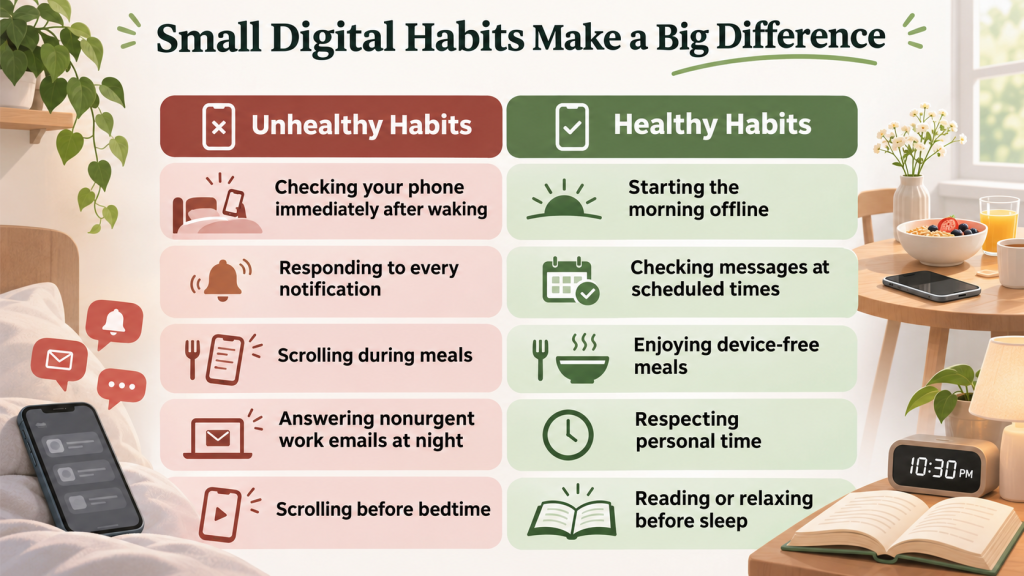
Pay attention to what your device use displaces. Are you postponing meals, avoiding tasks, checking messages during conversations, or struggling to put your phone away at bedtime?
Another sign is repeatedly opening apps without knowing what you want from them. Identifying a recurring trigger gives you something specific to change rather than a vague reason to feel guilty.
Establishing Healthier Social Media Habits
Problems arise when checking feeds becomes automatic or consistently leaves you feeling worse.
Decide which platforms serve a genuine purpose. Mute accounts that encourage unhelpful comparisons, unfollow content you no longer enjoy, and remove shortcuts that invite habitual checking.
Set aside a predictable period for browsing rather than filling every idle moment with updates. When that period ends, move on to a planned activity.
If you use social media professionally, distinguish necessary publishing and audience interaction from personal scrolling so that one does not quietly become the other.
Protecting Your Personal Time After Work
An effective work boundary begins with realistic expectations about availability. Discuss response times, urgent situations, and after-hours responsibilities with your manager or team rather than silently changing your communication habits.
At the end of your shift, review outstanding tasks, record tomorrow’s priorities, and close work applications.
People with irregular shifts or on-call duties may need different arrangements. Even then, defining which interruptions are necessary and which can wait creates a clearer distinction between being responsible and being permanently available.
Creating Screen-Free Morning and Evening Routines
Starting and ending your day without recreational screen use can make room for activities you otherwise neglect.
Start the morning with breakfast, a shower, or a few minutes of planning before opening social feeds. In the evening, choose a consistent point to stop checking nonessential messages. Reading, stretching, or preparing for tomorrow can fill that space.
If possible, keep your phone charging away from your pillow. Keep necessary medical alerts, emergency communication, and accessibility tools available throughout the night.

Setting Healthy Communication Limits With Others
People cannot reliably respect expectations they do not know about. Explain your preferences clearly instead of hoping that friends, relatives, or coworkers will interpret a delayed response correctly.
For example, tell friends that you rarely check messages during work or that you prefer a call when something urgent happens.
Boundaries also apply to privacy. You can decline requests for passwords, continuous location sharing, or immediate access to your personal conversations. Respectful communication leaves room for consent and does not require monitoring someone to prove trust.
Using Device Settings to Reduce Distractions
Start by reviewing notifications and keeping only those you genuinely need. Use Focus or Do Not Disturb modes to limit interruptions during chosen hours.
Screen-time tools can also reveal which applications consume more time than expected. Set limits for those apps, and move them away from your home screen if you frequently open them by reflex.
Review your exceptions before activating restrictions. Banking authentication, emergency contacts, navigation, and accessibility features should remain available when necessary. A useful setup removes distractions without making ordinary responsibilities unnecessarily difficult.
Replacing Unhelpful Screen Habits With Offline Activities
Removing an activity is easier to maintain when you know what will take its place. Consider what you gain from scrolling: entertainment, reassurance, social contact, or relief from boredom.
Match the replacement to that need. A walk might provide a mental break, while calling a friend may be more satisfying than browsing strangers’ updates. Keep a book, puzzle, or sketchpad accessible for quieter moments.
The goal is not to turn every minute away from your phone into productive work. Unstructured rest has a place, too.
How to Make Digital Boundaries Last
Start with a boundary that addresses your biggest frustration instead of attempting a complete digital overhaul. Practice it for a week, then assess whether it has made daily life easier.
Measure meaningful outcomes, such as fewer interrupted meals, more completed tasks, or less time spent browsing before bed. If a limit is repeatedly broken, investigate why it is impractical and revise it.
Prepare exceptions for travel, deadlines, or family needs. A flexible boundary can survive an unusual day without disappearing entirely.
Recommended Products to Support Digital Boundaries
These tools can help you make specific changes without relying entirely on your phone.
TIME TIMER MOD Home Edition 60-Minute Visual Timer, Fern Green
Best for: Uninterrupted work and study sessions.
A disappearing colored disk lets you see how much of a session remains without checking a smartphone. The timer operates without audible ticking and offers an optional completion alert. It works well for dedicated reading or work periods, although its countdown is limited to one hour and it requires an AA battery.
Braun BC02 Classic Travel Analogue Alarm Clock
Best for: Keeping smartphones away from the bedside.
This compact clock uses a quartz movement, luminous-tipped hands, and a gradually intensifying beep alarm. It gives you a practical alternative to relying on a phone for waking up, removing one reason to keep the device beside your bed. It needs an AA battery and does not offer smartphone-style scheduling flexibility.
kSafe Medium Time Locking Container
Best for: Voluntary, planned breaks from distracting devices.
The container locks its lid for a duration selected by the user, adding a physical barrier to impulsive device checking. Check the fit of your phone first. Because there is no normal override once the countdown begins, never lock away a device needed for emergencies, medical monitoring, or essential communication.
Rocketbook Core Reusable Smart Notebook, Executive Size, Black
Best for: Handwritten planning with optional digital storage.
The executive notebook provides reusable writing pages for priorities, meeting notes, and personal reminders. You can capture information by hand and scan selected pages later rather than keeping your phone open throughout the day. It requires compatible erasable ink, and saving notes digitally still involves using the companion application.
Digital Minimalism: Choosing a Focused Life in a Noisy World by Cal Newport
Best for: Developing a long-term approach to intentional technology use.
Newport’s book explores how to select digital activities based on personal values rather than convenience or habit. Its approach can help readers rethink which platforms deserve their time and what meaningful offline alternatives might look like. The advice requires adaptation, particularly for people whose livelihoods depend on staying connected.
What Research Reveals About Reducing Digital Interruptions
A 2025 randomized controlled trial in PNAS Nexus examined blocking internet access on smartphones for two weeks while preserving calls, text messages, and internet access on other devices.
Participants showed improvements in sustained attention and measures of psychological well-being. However, only about a quarter of those who initially committed met the study’s compliance criteria, highlighting the difficulty of maintaining substantial restrictions.
A separate 2015 experiment by Kostadin Kushlev and Elizabeth Dunn found that participants reported less daily stress when assigned to check email less frequently. Its findings support scheduled communication periods where work demands permit them.
These studies do not establish a universal screen-time limit or prove that every type of device use is harmful. They suggest that reducing unnecessary access and repeated checking can be worthwhile experiments, particularly when current habits interfere with daily functioning.
Frequently Asked Questions About Digital Boundaries
Are digital boundaries the same as a digital detox?
No. A digital detox usually involves temporarily reducing or avoiding particular forms of technology. Boundaries are ongoing agreements about how you use technology in everyday life. You might take a short detox to understand your habits, then establish sustainable limits that allow you to continue using valuable digital services.
How much recreational screen time should adults allow themselves?
No single daily goal works equally well for every adult. Consider whether recreational screen use interferes with sleep, relationships, movement, or responsibilities. Start by reducing activities that provide little value and monitor how you feel. The quality and purpose of your screen use matter alongside its duration.
How can I set limits without missing important messages?
Create a separate route for urgent communication. Ask essential contacts to call when immediate attention is necessary, and configure your device to allow those calls through its quiet mode. Check routine messages at predictable intervals. Test the arrangement before depending on it, especially if you have caregiving or on-call duties.
What if I need social media for my job?
Separate professional tasks from personal consumption. Schedule time to publish content, respond to customers, or review performance, and prepare a specific task list before opening the platform. When your work is complete, sign out or switch profiles. This approach preserves professional access while reducing opportunities for unrelated browsing.
Can setting technology limits help with anxiety?
It may help when constant notifications, upsetting content, or pressure to respond contribute to your anxiety. However, changing device habits cannot address every cause of anxiety, and online support can be valuable. If the symptoms continue or begin affecting your everyday life, consider talking with a qualified mental health professional.
Conclusion: Take Back Control of Your Digital Life
Healthy digital boundaries are less about how many hours you spend looking at a screen and more about whether technology supports the life you want to lead. Protect the moments that matter to you, communicate your availability, and make necessary exceptions without abandoning your overall intentions.
A separate alarm clock can help establish a quieter bedtime routine, while a visual timer offers a straightforward way to protect focused work. Neither is essential if your existing environment already supports those changes.
Understanding the habit loop can also help you recognize why familiar digital behaviors keep returning. Choose one recurring interruption that you want to reduce, establish a realistic limit around it, and review the result after a week before making further changes.