How to Be More Productive (Without Burning Out)

We may earn a commission for purchases made using our links. Please see our disclosure to learn more.
You’ve probably had that day where you’re busy from morning to night… but at the end you’re like, “Wait—what did I actually finish?”
If you’re here because you want to learn how to be more productive, I’m going to make this simple: productivity isn’t about turning yourself into a machine. It’s about getting the right things done with less stress, so you still have a life afterward.
Start With the Real Goal: Output, Not “Busy”
A lot of productivity advice accidentally turns into “how to do more stuff.” The real win is focusing on fewer tasks—and doing them really well.
Try this tiny mindset shift:
- Busy = lots of motion
- Productive = meaningful progress
If your day feels messy, it’s usually because your priorities are fuzzy. So before you chase hacks, decide what “productive” actually means for you this week: finishing a project, staying consistent at the gym, clearing your backlog, or just not feeling behind.
Do a Two-Minute Brain Dump to Clear the Fog
Your brain is a great idea machine… and a terrible storage device.
When you’re holding 27 open tabs in your head (calls, groceries, deadlines, “text my cousin back”), you’ll feel scattered even if you’re trying hard.
Do this:
- Set a 2-minute timer
- Write everything you’re thinking about (no organizing yet)
- Circle the top 1–3 things that actually matter today
It’s like clearing a cluttered kitchen counter before cooking. Suddenly, you can move.
Choose Your “One Thing” for Today
If you only do one meaningful thing today, what should it be?
Not ten things. Not “catch up.” One.
The “Finish Line” question
Ask: What would make me feel proud at 6 PM?
That answer is usually your highest-impact task.
Then make it specific:
- “Work on my blog” → “Draft the outline + intro”
- “Study” → “Do 25 practice questions”
Specific beats motivational every time.

Use Time Blocking (Even a Loose Version)
Time blocking sounds fancy, but it can be ridiculously simple: give your priorities an appointment.
A beginner-friendly time block
- 60–90 minutes: your “One Thing”
- 30 minutes: admin (email, messages)
- 30 minutes: life stuff (errands, planning)
You’re not chaining yourself to the desk. You’re just telling your day, “This matters—make room.”
If you hate strict schedules, do “soft blocks” like:
- Morning = deep work
- Afternoon = meetings + admin
- Evening = reset
Build a Distraction Shield (Phone, Tabs, People)
Distractions don’t feel like danger. They feel like small harmless snacks. One notification. One quick scroll. One “let me just check…”
And suddenly your focus is gone.
Your 3-part distraction shield
- Phone: place it out of reach (not just face down)
- Tabs: close everything not related to your task
- People: tell someone “I’m in focus mode for 45 minutes”
You don’t need superhero discipline. You need fewer temptations.
Beat Procrastination With the 5-Minute Start
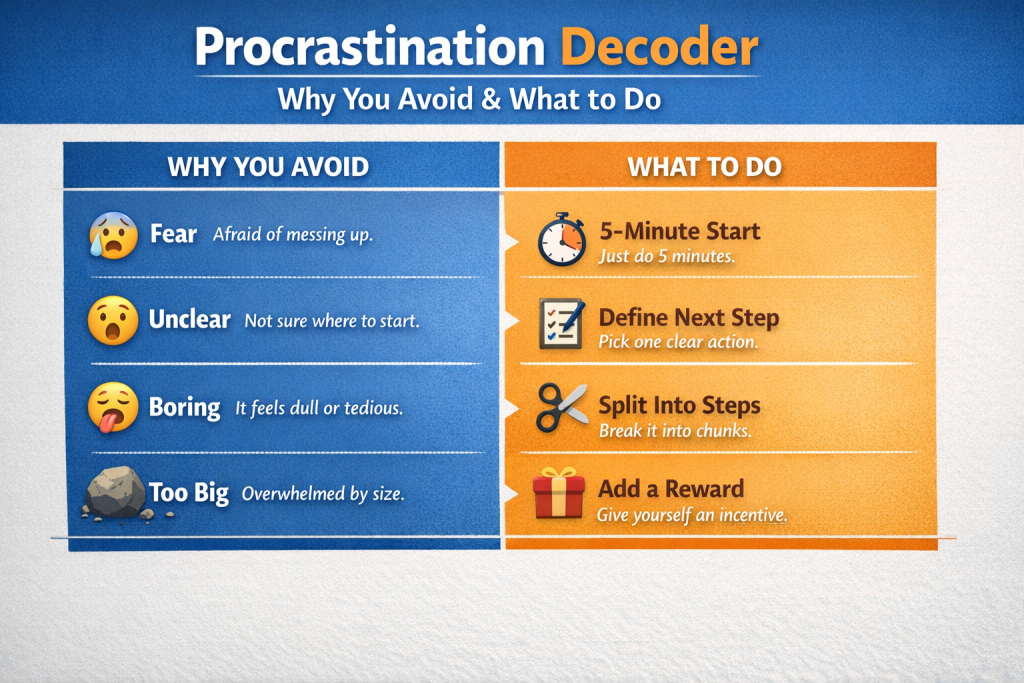
Most procrastination isn’t laziness. It’s discomfort: uncertainty, boredom, perfectionism, fear of doing it wrong.
So don’t “motivate” yourself. Lower the starting barrier.
The 5-minute rule
Say to yourself: “I just need to do this for five minutes.”
- Open the doc
- Write the first rough sentence
- Do the first tiny step
Momentum is sneaky. Once you start, your brain usually stops acting like a dramatic cat being forced into a bath.
Work in Sprints: The Power of Breaks
Trying to focus for 3–4 hours straight is like trying to sprint a marathon. You’ll burn out and blame yourself… when the strategy was the problem.
Try 45/15 or 25/5
- 45 minutes work / 15 minutes break (great for deep work)
- 25 minutes work / 5 minutes break (great for “ugh” tasks)
During breaks:
- stand up
- drink water
- look out a window
- do a quick stretch
Breaks aren’t a reward. They’re part of the system.
Energy > Time: Protect Your Sleep, Food, Movement
You can have all the time management tips in the world, but if your energy is low, everything feels harder.
No guilt here—just reality.
Three “minimums” that help a lot
- Sleep: consistent bedtime/wake time (even if not perfect)
- Food: protein + fiber earlier in the day
- Movement: 10 minutes counts (walk, stairs, stretching)
Think of your energy like phone battery. You can’t run heavy apps all day on 9%.

Make Your Environment Do the Hard Work
Your environment is either helping you focus… or silently sabotaging you.
Quick wins:
- keep your workspace “task-ready” (pen, charger, notebook)
- remove friction (logins, clutter, missing files)
- add one focus cue (lamp, playlist, timer)
If you work from home, even a tiny ritual helps:
- same seat
- same drink
- same “start” playlist
Your brain loves patterns. Use that.
Stop Overcommitting: Say No Without Being Weird
Overcommitting is productivity’s sneakiest villain because it wears a friendly mask.
A simple boundary script
- “I can do X, but not until Thursday.”
- “If this is urgent, what should I deprioritize?”
- “I’m fully booked this week—could we circle back next week?”
Saying no isn’t rude. It’s honest. And it protects your time for what matters.
Use Simple Systems: Lists, Templates, Routines
You don’t need a complicated productivity app stack. Most people do better with one simple system they actually use.
The “Today / This Week / Later” list
- Today: 1–3 priorities
- This week: supporting tasks
- Later: ideas + non-urgent stuff
Templates save brainpower
If you repeat something often (emails, reports, content outlines), create a reusable template. That’s not boring—that’s efficient.
Communication That Saves Hours (Not Minutes)
A huge productivity leak is unclear communication. Not “big drama” communication—just the everyday stuff:
- vague messages
- missing context
- unclear deadlines
- back-and-forth questions
Make messages “one-and-done”
When you message someone, include:
- what you need
- by when
- any key details
- your suggested next step
It feels slightly extra… until you realize it prevents 12 follow-up pings.
Tools That Help: 5 Product Picks for Focus & Planning
1) TIME TIMER Home MOD – 60 Minute Visual Timer
A visual countdown timer that makes time feel real (especially helpful for time blocking and work sprints).
Features: visual time “disk,” 60-minute range, simple controls
Use cases: Pomodoro-style focus, studying, ADHD-friendly routines, meeting time-boxing
Who it’s for: anyone who loses track of time once they “get in the zone” (or while avoiding the zone)
2) LEUCHTTURM1917 Hardcover Medium A5 Notebook (Dotted)
A durable, clean notebook that’s perfect for bullet journaling and planning without distractions.
Features: A5 size, numbered pages, dotted layout, opens flat (varies by model)
Use cases: daily planning, habit tracking, project breakdowns
Who it’s for: people who think better on paper (and want their notes to stay organized)
3) Rocketbook Core Reusable Smart Notebook (Letter Size)
Write like paper, then scan to the cloud—great if you want less clutter and searchable notes.
Features: reusable pages, app scanning, easy digital organization
Use cases: meeting notes, class notes, content planning, brainstorming
Who it’s for: anyone who wants “paper brain” + “digital storage”
4) Logitech MX Master 3S Bluetooth Edition Wireless Mouse
A productivity mouse that reduces friction—especially if you do lots of scrolling, editing, or multitasking.
Features: ergonomic shape, fast scrolling, quiet clicks (model dependent)
Use cases: design work, spreadsheets, writing, long computer sessions
Who it’s for: desk workers who want speed + comfort (hello, fewer “hand feels weird” days)
5) Soundcore Q30 by Anker Noise Cancelling Headphones
Creates a quieter bubble so you can focus—especially in shared spaces.
Features: active noise cancelling modes, long battery life (varies by use), comfy over-ear fit
Use cases: deep work, studying, commuting, working in cafés
Who it’s for: anyone whose brain treats background noise like an open invitation to lose focus
Research-Backed Productivity Moves
Let’s add some credibility to the “why this works” part—without turning this into a textbook.
Interruptions are expensive (and not just “annoying”)
Research on workplace interruptions shows they increase stress and can disrupt task flow—meaning you don’t just lose the minute you were distracted, you lose the ramp back in. See: how to be more productive by reducing interruptions (Mark, 2008).
Related research often cited in this area reports that it can take around 23 minutes to fully resume an interrupted task. That’s why “quick checks” are rarely quick.
Practical takeaway: build small “no-interruption zones” (even 30–45 minutes) where notifications are off and you’re working on one thing.
Task switching leaves “attention residue”
When you jump between tasks, part of your attention can stay stuck on the previous task—like glitter you can’t fully shake off your hands. That’s called attention residue, and it can reduce performance on the next task. See: how to be more productive by avoiding attention residue (Leroy, 2009).
Practical takeaway: batch shallow tasks together (email, messages, admin) and protect a single block for deep work.
One more “quiet productivity” booster: clearer communication
If you want to cut down the back-and-forth that eats your day, this communication skills guide is a helpful add-on—especially for work, clients, and group projects.
FAQs: How to Be More Productive in Real Life
How can I be more productive when I feel unmotivated?
Make the first step tiny. Tell yourself “five minutes only,” and choose the easiest entry point (open the doc, write a rough line, set up the task). Motivation often shows up after you start.
How do I stop procrastinating on big tasks?
Shrink the task until it feels safe to begin. Replace “finish the project” with “write the first messy paragraph” or “make the outline.” Clarity + a small start beats pressure.
What’s the best daily routine for productivity?
A simple one:
- pick your top 1–3 priorities
- block one focus sprint for the top task
- batch admin later
- do a 10-minute reset at the end (plan tomorrow, tidy desk)
How do I be more productive without burning out?
Protect recovery like it’s part of the job: breaks, sleep consistency, movement, and realistic planning. Sustainable productivity looks “boring” on the outside—and feels peaceful on the inside.
How can I stay focused while working from home?
Use environmental cues: same workspace, start ritual, and a clear “focus block” boundary. Also: phone out of reach. Home is full of tiny traps that politely ask you to abandon your plan.
Conclusion
If you take nothing else from this: productivity isn’t about doing more—it’s about doing what matters with less friction.
Start small:
- pick one priority
- protect one focus sprint
- reduce distractions
- let your energy lead the plan
You don’t need a perfect system. You need a repeatable one—something that works even on normal days when you’re a little tired and life is a bit loud.
If you want, tell me your situation (student, remote worker, business owner, parent juggling 18 things), and I’ll tailor a simple weekly plan around your real schedule.